---
title: My new, weird smartcard and how I learned to use it
date: 2022-09-18
series: ethereum
tags:
- gpg
- fido2
- webauthn
- 2fa
- smartcard
hero:
ai: Stable Diffusion
file: golden-hill
prompt: a golden hill in front of a sunset, forgiveness, color tinted skies, matte painting
---
Hey, this article is going to talk about something related to a subject that
is fairly divisive and I want you to seriously re-evaluate your reactions
before you act on your first impulse. I've been working towards my goal of
being [a better, less toxic person](https://xeiaso.net/blog/against-toxicity-programming-languages)
and something that has come up repeatedly in that self-re-evaluation is that
I have been horribly toxic against people that like cryptocurrencies.
I have been needlessly horrible to people. I have sowed toxicity. I
have furthered divides that do not need to exist. A lot of this has been out
of the fear of inadvertently scamming people or leaving people open to be
scammed, but after deep introspection, I no longer want to be known for
that. It feels so right in the moment, I feel that fear and I have
lashed out in anger because of it.
No more. I do not want to be known for fostering hate, resentment, or anything
adjacent to it. If you were one of the people I have hurt with my toxicity, I
whole-heartedly apologize and I am going to reach out to the people I feel I
have hurt the most to apologize privately.
As you read this article, please try to take things at face value and
reconsider your gut feelings as I have been. Hate is learned. Let's work to
unlearn it. Fear can't lead to anger, hate, or suffering if we choose to not
let it.
> The best things in life come with disclaimers
- Socrates, probably
When you speak for professional conferences, sometimes you get a goodie bag with
random stuff in it. Recently [I spoke at
RustConf](https://xeiaso.net/talks/rustconf-2022-sheer-terror-pam) about
authentication technologies. Among other things (such as a very nice picnic bag
that I will be sure to make use of), I got a [Ledger Nano
X](https://shop.ledger.com/products/ledger-nano-x) hardware cryptocurrency
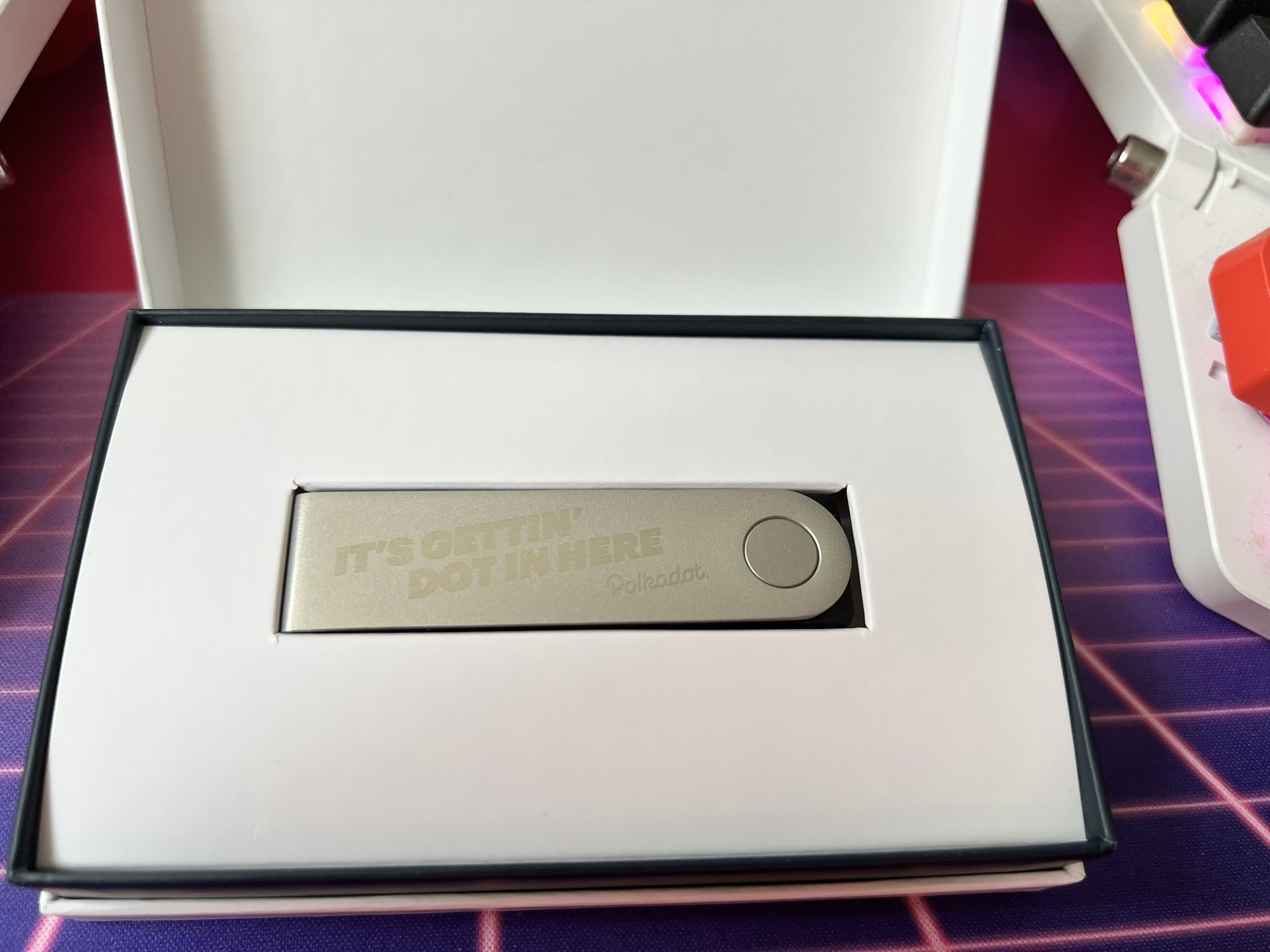
wallet. It is a custom engraved one too. It looks really, really nice. Here's a
picture of it:
I am not really a Bitcoin person. Most of my experiences in the cryptocurrency
space have been overwhelmingly negative. I'm pretty sure a huge part of the
reason I was made to drop out of school has to do with the fact that a large
part of my college tuition was being paid for with Bitcoin...through [Mt.
Gox](https://en.wikipedia.org/wiki/Mt._Gox).
It's worth noting that this is not a paid review. I was not asked to write
this article. I consciously chose to write this article based on my
experiences (mostly after the debacle with trying to use it as a GPG
smartcard, see below). I am not involved with Polkadot, The Web3 Foundation
or anything involved with that technology. I was given the device as part of
a wide gift program with no expectations or targeting. I have no affiliation
with Polkadot or the Web3 Foundation.
You can see how that would sour my views on cryptocurrency, eh?
One of the most positive experiences I had with cryptocurrency was when someone
donated about $200 in ethereum to me. Coinbase let me turn that into money
dollars fairly easily. Probably could have made more if I held onto it, but
overall, it was a good experience.
## Setting it up
So now here I am with this hardware key escrow device and now I need to figure
out how to use it. I read that these things can also be used as very paranoid
GPG smartcards, WebAuthn tokens, and even _password managers_. This is very
interesting to me, even if I'm not totally jazzed about the other associated
uses of such a key escrow hardware token.
Fun fact, I looked to see what the resale value of these devices are in the
secondhand market. Turns out the target market for these things actively
avoids secondhand devices. Can't blame them. This is a very paranoid device
designed to cater to a very paranoid market. Buying such a hardware token
second-hand is very counter to that view of paranoia. Arguably by finding
_any_ use for it I am preventing E-waste, but more on that later as the saga
continues...
Either way, this thing is in front of me, so I want to see what I can actually
do with it. So, I started out by unpacking it and going through the
first-time-user-experience (FTUX).
Devices like this have a deterministic random-number-generator that is seeded by
an initial entropy seed. When the device generates this entropy seed, it also
creates a recovery phrase for it. The recovery phrase is a 24 word series of
random English words that [correlate to hexadecimal
values](https://github.com/Bitcoin/bips/blob/master/bip-0039.mediawiki). This
allows you to be able to load that seed into a new device should your old one
break. Because all of the randomness is deterministically generated from the
original seed, this means that you can recreate all the private keys for all of
your cryptocurrency accounts without the private keys ever having to leave the
old device. Even if you totally obliterate the original device. This is pretty
neat.
Another neat part about the FTUX is that when it presents the recovery phrase,
it asks you to write it down (and even includes a little card for you to do so).
Once it's shown you the whole phrase and you've written it down, then it does
something that both surprised me and has really made me rethink cryptographic
key generation in general: it makes you confirm what every part of the key
phrase are. It also puts incorrect answers in the options. This is _genius_. It
both proves that you have written the passphrase down _and that you did it
correctly_. If I ever make something that has cryptographic keypairs like this,
I'm going to be sure to remember this and add it to the FTUX whenever I can.
So, at this point I have a hardware cryptocurrency wallet set up and after
following the instructions for setting up the app, I got a prompt to update the
firmware. I did. I got another prompt to update the firmware. I did.
Weird that it didn't just slipstream the two updates into one big one. I would
have expected it to do that.
After that was all done, I enabled "Developer mode" in their app and downloaded
the following apps:
- [FIDO 2/U2F/WebAuthn key support](https://support.ledger.com/hc/en-us/articles/115005198545-FIDO-U2F?docs=true)
- [Passwords](https://support.ledger.com/hc/en-us/articles/360017501380-Passwords?docs=true)
- [GNU Privacy Guard (gpg)](https://support.ledger.com/hc/en-us/articles/115005200649-OpenPGP)
- Ethereum (to only be used after The Merge to a proof of stake chain, still not
sure how things are going to work out there but at the very least I want to
maintain it as _an option_, if only for my private experimentation)
At this point I realized that the CAD$200 device in front of me only had _two
megabytes_ of usable storage. This feels like a very small amount to me, but
when I looked at the filesizes of the apps it turns out it's okay. At this time
with those apps, I'm only using 1/4th of the total storage of the device.
I wonder if they're using a smaller amount of storage because it's more
durable. I also wonder if the lion's share of the cost comes from the hardware
security element bits and the amount of validation and formal verification
that goes into developing something like this. Either way, for the very small
keypairs (Ethereum keypairs are 256 bits) that are being stored it's probably
fine this way. Still kind of weird, but it's tolerable.
They could probably cheat even and take advantage of the deterministic nature
of the randomness to avoid storing the keypairs in the first place. If there's
a deterministic random seed then you theoretically don't even need to store
the keypair in the first place, just keep track of which "account" correlates
to which entropy step from the initial seed. It'd be a bit jank but it should
work perfectly.
## Testnet testing
Now that I had everything set up, I decided to test it with a testnet
transaction with the infamous Bitcoin testnet. In the past, the Bitcoin testnet
has been something that I've used to validate that a cryptocurrency client is
working. The Bitcoin testnet is effectively a second copy of Bitcoin that has a
lot less traffic and it's mutually agreed that testnet coins have zero monetary
value.
Turns out money only has value if everyone agrees that it does.
I downloaded the app, generated an account on the testnet, then pasted the
address into some random [Bitcoin testnet
faucet](https://testnet.help/en/btcfaucet/testnet). Bitcoin "faucets" were
public services that gave people a small amount of Bitcoin to test that they can
make transactions. As Bitcoin grew in value, the level of abuse towards faucets
increased drastically to the point that they stopped existing. The only
remaining ones are for the Bitcoin testnet, which have no real monetary value.
I saw my account balance go up. Success! I had managed to use this hardware
device for the purpose it was designed for. I was now a lot more confident in
going off script and really having fun with the thing. After returning the
testnet funds back to the faucet (this is considered a polite move), I deleted
the Bitcoin testnet application from the device and started planning my next
move.
If you delete the app, do the keypairs disappear too?
No. Remember that the keys are deterministically generated from a seed value.
This means you can reinstall the app later and get your accounts back. This
also extends to the other applications on this device. This is one of the most
genius ways to use deterministic randomness I have ever seen and is certainly
why there is so much dire messaging around keeping your recovery phrase
secure. I'm considering putting a copy of my recovery phrase in a safety
deposit box or something.
## FIDO2/U2F/WebAuthn
Hardware token based authentication has gotten complicated as standards have
been developed. However, most of the tokens have standardized around the
[WebAuthn](https://en.wikipedia.org/wiki/WebAuthn) protocol, which uses a
secure element to sign messages from a server and then the server checks the
signatures to ensure the same device sent the message. This means that you can
have a hardware token like a [Yubikey](https://www.yubico.com/) to securely
authenticate to remote services like Google, GitHub, and DashLane.
However, Yubikeys aren't your only option. The secure element in M1 macs can be
used for WebAuthn. The TPM in your Windows 11 PC can be used for WebAuthn (I'm
pretty sure this is why Windows 11 requires a TPM). And, the [Ledger Nano X
supports WebAuthn (via
FIDO2)](https://support.ledger.com/hc/en-us/articles/115005198545-FIDO-U2F).
You can set it up by following their documentation, but at a high level you do
this:
- Install the FIDO U2F application to your wallet
- Open the app on the wallet
- Open the security key registration page for your service of choice (On GitHub
it's [here](https://github.com/settings/two_factor_authentication/configure))
- Hit "Register new security key" (or whatever the site says)
- Confirm on your device
Et voila! You have set up this hardware key escrow device as a security device.
It should Just Work. You can test it by logging out of GitHub and then trying to
log back in with the wallet unlocked. You will be prompted on the wallet to
accept the request. You can say "yes" or "no" and things will work out.
I did have some problems getting it to work with Safari though. With Safari on
my MacBook Air I'm not able to reliably use this device as a hardware security
key. For some reason Safari keeps spamming signature requests to the device and
accepting the signin is probably frame-perfect. I haven't been able to get it
working, but it does work with Microsoft Edge. So there is that.
At first when I tried to use it on Windows 11, Windows got very confused. It
kept trying to use my tower's TPM as a WebAuthn key. However things worked fine
when I tried using it on my MacBook. It worked perfectly on Linux, to nobody's
surprise.
I would be willing to say that this hardware cryptocurrency wallet is a decent
FIDO2 key. It's also the only FIDO2 key I know of that makes you unlock the
device with a PIN (one that you enter on the device itself) before you can use
it. I don't think it's worth going out and buying one just for that though, it
doesn't have support for [`ed25519-sk` SSH keys in resident
mode](https://xeiaso.net/blog/yubikey-ssh-key-storage), which means that your
SSH key can't be stored on the device itself unless you use GPG, which is kinda
lame but understandable given the constraints of this device.
It will work for non-resident keys though! It is a lot cooler to put the keys
directly on the device, but in a pinch it's okay.
## Password management
This device is basically a hardware random number generator with a bunch of
fluff about cryptocurrency on top. Secure passwords are basically just a bunch
of random data encoded as printable characters. It's reasonable to go from
"random data" to "password" with some trivial transformations.
This device has a password manager built in. You can install it by following the
[directions from
upstream](https://support.ledger.com/hc/en-us/articles/360017501380-Passwords?docs=true).
It will let you generate passwords from that base passphrase and then it can
pretend to be a keyboard to type them out very quickly. I'm going to keep this
around, but I don't personally see myself using this device as a password
manager. I already have password managers do what I need.
However in a pinch, I could see this being a viable option. If I was a lot
bigger into the cryptocurrency ecosystem and I was very paranoid about password
theft, I'd probably want to use something like this as a password manager. If
only because the PIN-lock would make me feel better about it.
The placebo effect is real.
## GPG
Okay, I've been putting this off for long enough. Let's go over the final boss
of security hardware: pretending to be a GPG smartcard.
[GNU Privacy Guard (GPG)](https://gnupg.org/) is one of the oldest, most mature,
and widely known privacy ecosystems in the world. The basic idea is that it
gives you a keypair that you can use to do the following things:
- Sign messages to let people prove you published it
- Encrypt messages to target specific people so that nobody in the middle can
understand the message
- Authenticating yourself to SSH servers or other systems
One of the main downsides is that the user experience is awful. It is so bad. I
have [tried to use GPG in the past and
failed](https://xeiaso.net/blog/new-gpg-key-2021-01-15) numerous times.
Including but not limited to accidentally creating a key that can't be used for
anything.
I knew I was in for a ride, but I didn't quite think it would be as bad as it
was with this device. So I opened [their
documentation](https://github.com/LedgerHQ/openpgp-card-app/blob/942e16f74ab8aa71644be8e6780ef63109cba599/doc/user/blue-app-openpgp-card.pdf)
and looked at how to do it on my mac. It looked normal at first, then I got to
this part that I am going to quote verbatim:
> - First it is necessary to [disable SIP (System Integrity Protection, it
> basically turns MacOS into an immutable OS for security reasons)](https://developer.apple.com/library/mac/documentation/Security/Conceptual/System_Integrity_Protection_Guide/ConfiguringSystemIntegrityProtection/ConfiguringSystemIntegrityProtection.html) That doesn’t allow the editing of files in /usr/.
> - You have to add the Nano S to [the end of each list in the file] `/usr/libexec/SmartCardServices/drivers/ifd-ccid.bundle/Contents/Info.plist`:
> - In ifdVendorID add the entry 0x2C97
> - In ifdProductID add the entry 0x0001
> - In ifdFriendlyName add the entry Ledger Token
> - [Enable SIP](https://developer.apple.com/library/content/documentation/Security/Conceptual/System_Integrity_Protection_Guide/ConfiguringSystemIntegrityProtection/ConfiguringSystemIntegrityProtection.html)
W...what. In order to use a _security device_ they want you to _disable the
trust layer of macOS_ to append some XML to a random file? How on earth is
that safe? What were they _thinking_???
Yeah, I've been trying to keep a positive tone for this article and assume
good intentions, etc. But oh god this is like a red flag the size of
Australia. What the hell where they thinking? This is kind of hot take worthy
even though that goes against the anti-toxicity point I raised in the header
of this article. I really don't know what to say here. I am kind of
speechless.
This understandably discouraged me from trying to use the device as a hardware
PGP key (though if it worked as one it would be quite possibly one of the best
conference swag gifts ever, if only because something that I only use as a GPG
key would be so invaluable, you have no idea).
Last night, on a lark I decided to try using it anyways. It worked on my MacBook
Air without having to crack open the readonly seal. I was shocked at first, then
very annoyed that the docs both told you to do something extremely very wrong
and they were outdated.
Whatever. It works as a GPG smartcard. That makes it worth using for me in
particular. I don't really use GPG much, but when I do it's going to be nice to
have my keypair already set up and ready.
## The battery saga
When I unplug the device, the screen turns off. I thought this was normal. Turns
out it isn't. It has a 100 milliamp-hour battery in it. The battery isn't
working on my device. I have tried charging it with the following devices, just
in case:
- Steam Deck charger
- Anbernic Win600 charger
- Nintendo Switch charger
- My tower PC
- My MacBook
- An old 5 watt iPhone charger I had to dig up out of storage
I can't get the device to charge. It only works over USB. This is okay-ish for a
smartcard, but it would be nice if the device worked up to the manufacturer's
specifications. You know, just in case I actually use it as a password manager
for some reason.
I contacted the manufacturer, who was very confused and said that I didn't have
an order registered in their system. Understandable. I didn't have an order,
this was a free gift from a conference sponsor.
I got in contact with the sponsor and apparently they're just gonna send me a
whole other hardware wallet so I guess I'm going to have two of them. Hopefully
one of them will have a working battery.
Yummmmm, sweet e-waste!
## Conclusion
This device is an okay hardware token. It is a very paranoid security device and
if you are actually into cryptocurrency, it's probably a decent option. I'm not
into cryptocurrency though, so I am a bad person to take this kind of advice
from.
A friend of mine that is very into cryptocurrency has told me that Ledger is the
"bad option" for hardware wallets and that most of the mindshare is with
[Trezor](https://trezor.io/) devices. These devices also apparently have the
best UX. I don't know for sure. I only have a Ledger Nano X in front of me, and
if this is the _bad_ option, then better options are surely much easier to use.
I just wish this wasn't tied to cryptocurrency, but I can deal with it. Can't
beat the price!
---
As an aside, during the process of trying to figure things out, I tried to read
into how some of the currencies that the Ledger app supports work. The level of
jargon is impressive and impenetrable to someone like me without very much
context as to what is going on. This is how people outside of tech see our
profession. This really gives me pause and has made me wonder how we can make
things in tech more equitable so that other people can come up to speed more
easily.
Maybe things should be written in a way that is easier to understand and
gradually introduces jargon as the user gets more familiar.