
diff options
| author | Xe Iaso <me@xeiaso.net> | 2023-10-24 12:50:58 -0400 |
|---|---|---|
| committer | Xe Iaso <me@xeiaso.net> | 2023-10-24 12:50:58 -0400 |
| commit | 2b79b00b15a1b5f516ca10c6cf38c4da783de353 (patch) | |
| tree | 3bc0dc500d553f751a7912b55c40d45679565e67 /lume/src | |
| parent | 064c2cf0a024fa67450f4511bd0d42adb4ec51cf (diff) | |
| download | xesite-2b79b00b15a1b5f516ca10c6cf38c4da783de353.tar.xz xesite-2b79b00b15a1b5f516ca10c6cf38c4da783de353.zip | |
move more assets to XeDN, reduce site zip further
This also compresses all compressible artifacts with gzip, enabling a
future XeDN patch to serve xeiaso.net directly.
This uses gzip in particular as an opportunistic speedhack for serving
gzip directly to clients that accept gzipped files.
Signed-off-by: Xe Iaso <me@xeiaso.net>
Diffstat (limited to 'lume/src')


95 files changed, 186 insertions, 8018 deletions
diff --git a/lume/src/_components/ads.njk b/lume/src/_components/ads.njk index f11365d..c28070a 100644 --- a/lume/src/_components/ads.njk +++ b/lume/src/_components/ads.njk @@ -1,2 +1,2 @@ -<script async src="https://media.ethicalads.io/media/client/ethicalads.min.js"></script> -<div data-ea-publisher="christinewebsite" data-ea-type="text" data-ea-style="fixedfooter"></div>
\ No newline at end of file +<!--s<script async src="https://media.ethicalads.io/media/client/ethicalads.min.js"></script> +<div data-ea-publisher="christinewebsite" data-ea-type="text" data-ea-style="fixedfooter"></div>-->
\ No newline at end of file diff --git a/lume/src/blog/change-2021-10-20.mdx b/lume/src/blog/change-2021-10-20.mdx index 7639aa9..4125cb8 100644 --- a/lume/src/blog/change-2021-10-20.mdx +++ b/lume/src/blog/change-2021-10-20.mdx @@ -111,14 +111,14 @@ family of origin. <center> <picture> <source - srcset="/static/blog/change/the-dude-dither.avif" + srcset="https://cdn.xeiaso.net/file/christine-static/static/blog/change/the-dude-dither.avif" type="image/avif" /> <source - srcset="/static/blog/change/the-dude-dither.webp" + srcset="https://cdn.xeiaso.net/file/christine-static/static/blog/change/the-dude-dither.webp" type="image/webp" /> - <img src="/static/blog/change/the-dude-dither.png" alt="The dude abides" /> + <img src="https://cdn.xeiaso.net/file/christine-static/static/blog/change/the-dude-dither.png" alt="The dude abides" /> </picture> </center> diff --git a/lume/src/blog/gamebridge-2020-05-09.md b/lume/src/blog/gamebridge-2020-05-09.md index a6cab5b..b9fa782 100644 --- a/lume/src/blog/gamebridge-2020-05-09.md +++ b/lume/src/blog/gamebridge-2020-05-09.md @@ -24,10 +24,10 @@ two programs looks like this: [ufifo]: https://man7.org/linux/man-pages/man7/fifo.7.html  +gamebridge stack](https://cdn.xeiaso.net/file/christine-static/static/blog/gamebridge.png) You can view the [source code of this diagram in GraphViz dot format -here](/static/blog/gamebridge.dot). +here](https://cdn.xeiaso.net/file/christine-static/static/blog/gamebridge.dot). The main magic that keeps this glued together is the use of _blocking_ I/O. This means that the bridge input thread will be blocked _at the kernel level_ diff --git a/lume/src/blog/nixos-vr-hell-2021-12-02.mdx b/lume/src/blog/nixos-vr-hell-2021-12-02.mdx index f18d505..8f5469b 100644 --- a/lume/src/blog/nixos-vr-hell-2021-12-02.mdx +++ b/lume/src/blog/nixos-vr-hell-2021-12-02.mdx @@ -127,7 +127,7 @@ controllers in VR and it seemed like the occlusion model was backwards: <center>  +outside](https://cdn.xeiaso.net/file/christine-static/static/blog/vr-hellscape/backwards_controller.png) </center> @@ -326,7 +326,7 @@ like:  +logo.](https://cdn.xeiaso.net/file/christine-static/static/blog/vr-hellscape/steam_debian_arch_friendship.jpg) </center> @@ -343,7 +343,7 @@ off of it. My disk layout looks a bit like this: <center> - +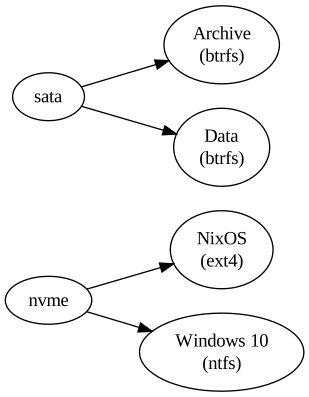 </center> @@ -444,7 +444,7 @@ wisdom: <center> - + </center> diff --git a/lume/src/blog/open-source-broken-2021-12-11.mdx b/lume/src/blog/open-source-broken-2021-12-11.mdx index bfe7ad0..ff0b5c7 100644 --- a/lume/src/blog/open-source-broken-2021-12-11.mdx +++ b/lume/src/blog/open-source-broken-2021-12-11.mdx @@ -58,7 +58,7 @@ are irrelevant.  +heartless taking without giving attitude](https://cdn.xeiaso.net/file/christine-static/static/blog/5xi3x7.jpg) </center> diff --git a/lume/src/blog/super-bootable-64-2020-05-06.md b/lume/src/blog/super-bootable-64-2020-05-06.md index 9da7171..e567eb1 100644 --- a/lume/src/blog/super-bootable-64-2020-05-06.md +++ b/lume/src/blog/super-bootable-64-2020-05-06.md @@ -37,7 +37,7 @@ crazy, wouldn't it?  +Hahaha porting machine go brrrrrrrr](https://cdn.xeiaso.net/file/christine-static/static/blog/portingmachinegobrrr.png) Someone did. The fruits of this effort are available [here][sm64dc]. This was mostly a proof of concept and is a masterpiece in its own right. However, @@ -369,7 +369,7 @@ cp /nix/store/fzk3psrd3m6x437m6xh9pc7bnv2v44ax-nixos.iso/iso/nixos.iso ~/Downloa Now you are free to do whatever you want with this, including [booting it in a virtual machine][bootinvmmp4]. -[bootinvmmp4]: /static/blog/boot2mario.mp4 +[bootinvmmp4]: https://cdn.xeiaso.net/file/christine-static/static/blog/boot2mario.mp4 This is why I use NixOS. It enables me to do absolutely crazy things like creating a bootable ISO of Super Mario 64 without having to understand how to diff --git a/lume/src/blog/templeos-1-installation-and-basic-use-2019-05-20.md b/lume/src/blog/templeos-1-installation-and-basic-use-2019-05-20.md index 492bf1c..bb9df47 100644 --- a/lume/src/blog/templeos-1-installation-and-basic-use-2019-05-20.md +++ b/lume/src/blog/templeos-1-installation-and-basic-use-2019-05-20.md @@ -40,31 +40,31 @@ TempleOS works decently with [VirtualBox](https://www.virtualbox.org) and [VMWar TempleOS is a 64 bit OS, so pick the type `Other` and the version `Other/Unknown (64-bit)`. Name your VM whatever you want: - + Then press Continue. [TempleOS requires 512 MB of ram to boot](https://github.com/Xe/TempleOS/blob/master/ReadMe.TXT#L11), so let's be safe and give it 2 gigs: - + Then press Continue. It will ask if you want to create a new hard disk. You do, so click Create: - + We want a VirtualBox virtual hard drive, so click Continue: - + Performance of the virtual hard disk is irrelevant for our usecases, so a dynamically expanding virtual hard disk is okay here. If you feel better choosing a fixed size allocation, that's okay too. Click Continue: - + The ISO this OS comes from is 20 MB. So the default hard disk size of 2 GB is way more than enough. Click Continue: - + Now the VM "hardware" is set up. @@ -72,29 +72,29 @@ Now the VM "hardware" is set up. TempleOS actually includes an installer on the live CD. Power up your hardware and stick the CD into it, then click Start: - + Within a few seconds, the VM compiles the compiler, kernel and userland and then dumps you to this screen, which should look conceptually familiar: - + We would like to install on the hard drive, so press `y`: - + We're using VirtualBox, so press `y` again (if you aren't, be prepared to enter the IRQ's of your hard drive/s and CD drive/s): - + Press any key and wait for the freeze to happen. The installer will take over from here, copying the source code of the OS, Compiler and userland as well as compiling a bootstrap kernel: - + After a few seconds, it will ask you if you want to reboot. You do, so press `y` one final time: - + Make sure to remove the TempleOS live CD from your hardware or it will be booted instead of the new OS. @@ -102,23 +102,23 @@ Make sure to remove the TempleOS live CD from your hardware or it will be booted The [TempleOS Bootloader](https://github.com/Xe/TempleOS/blob/1dd8859b7803355f41d75222d01ed42d5dda057f/Adam/Opt/Boot/BootMHDIns.HC#L69) presents a helpful menu to let you choose if you want to boot from a copy of the old boot record (preserved at install time), drive C or drive D. Press 1: - + The first boot requires the dictionary to be uncompressed as well as other housekeeping chores, so let it do its thing: - + Once it is done, you will see if the option to take the tour. I highly suggest going through this tour, but that is beyond the scope of this article, so we'll assume you pressed `n`: - + ### Using the Compiler - + The "shell" is itself an interface to the HolyC (similar to C) compiler. There is no difference between a "shell" REPL and a HolyC repl. This is stupidly powerful: - + ``` "Hello, world\n"; @@ -128,25 +128,25 @@ Let's make this into a "program" and disassemble it. This is way easier than it Open a new file with `Ed("HelloWorld.HC");` (the semicolon is important): - + - + Now press Alt-Shift-a to kill autocomplete: - + Click the `X` in the upper right-hand corner to close the other shell window: - + Finally press drag the right side of the window to maximize the editor pane: - + Let's put the hello word example into the program and press `F5` to run it: - + Neat! Close that shell window that just popped up. Let's put this hello world code into a function: @@ -160,7 +160,7 @@ HelloWorld; Now press `F5` again: - + Let's disassemble it: @@ -172,7 +172,7 @@ U0 HelloWorld() { Uf("HelloWorld"); ``` - + The `Uf` function also works with anything else, including things like the editor: @@ -180,11 +180,11 @@ The `Uf` function also works with anything else, including things like the edito Uf("Ed"); ``` - + All of the red underscored things that look like links actually are links to the source code of functions. While the HolyC compiler builds things, it internally keeps a sourcemap (much like webapp sourcemaps or how gcc relates errors at runtime to lines of code for the developer) of all of the functions it compiles. Let's look at the definition of `Free()`: - + And from here you can dig deeper into the kernel source code. diff --git a/lume/src/blog/templeos-2-god-the-rng-2019-05-30.md b/lume/src/blog/templeos-2-god-the-rng-2019-05-30.md index a4f5cf4..bb7e62b 100644 --- a/lume/src/blog/templeos-2-god-the-rng-2019-05-30.md +++ b/lume/src/blog/templeos-2-god-the-rng-2019-05-30.md @@ -55,7 +55,7 @@ const God = struct { } ``` -Most of the fields in our snipped `CGodGlbls` are related to internals of TempleOS (specifically it uses a glob-mask to match filenames because of the [transparent compression that RedSea offers](https://templeos.holyc.xyz/Wb/Doc/RedSea.html)), so we can ignore these in the Zig port. What's curious though is the `words` list of strings. This actually points to [every word in the King James Bible](/static/blog/tos_2/Vocab.DD). The original intent of this code was to have the computer assist in divination. The above kind of ranting link to templeos.holyc.xyz tries to explain this: +Most of the fields in our snipped `CGodGlbls` are related to internals of TempleOS (specifically it uses a glob-mask to match filenames because of the [transparent compression that RedSea offers](https://templeos.holyc.xyz/Wb/Doc/RedSea.html)), so we can ignore these in the Zig port. What's curious though is the `words` list of strings. This actually points to [every word in the King James Bible](https://cdn.xeiaso.net/file/christine-static/static/blog/tos_2/Vocab.DD). The original intent of this code was to have the computer assist in divination. The above kind of ranting link to templeos.holyc.xyz tries to explain this: ``` The technique I use to consult the Holy Spirit is reading a microsecond-range @@ -178,7 +178,7 @@ bits = GodBits(64, "a demo for the blog"); <iframe width="560" height="315" src="https://www.youtube.com/embed/aJEFLIPNkKM" frameborder="0" allow="accelerometer; autoplay; encrypted-media; gyroscope; picture-in-picture" allowfullscreen></iframe> - +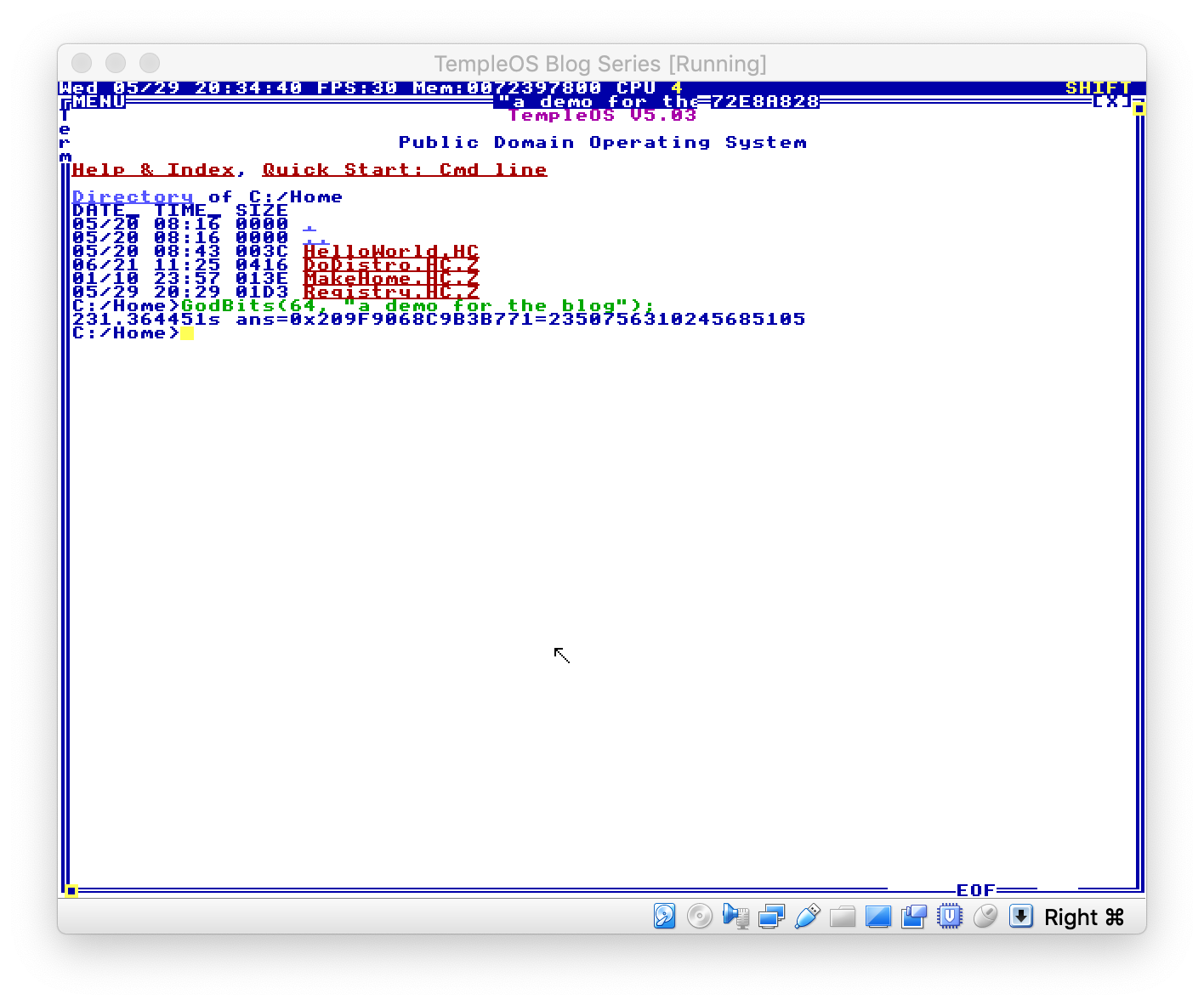 This is actually also a generic userspace function that applications can call. [Here's an example of `god` drawing tarot cards](https://github.com/Xe/TempleOS-tools/blob/master/Programs/Tarot.HC). @@ -268,11 +268,11 @@ uncultivated Yikes! Loading the wordlist is expensive (alternatively: my arbitrary gas limit is set way too low), so it's a good thing it's only done once and at boot. Still, regardless of this TempleOS boots in [only a few seconds anyways](https://i.imgur.com/O3FFsqA.png). -The final product is runnable via [this link](/static/blog/tos_2/wasm_exec.html). Please note that this is not currently supported on big-endian CPU's in browsers because Mozilla and Google have totally dropped the ball in this court, and trying to load that link will probably crash your browser. +The final product is runnable via [this link](https://cdn.xeiaso.net/file/christine-static/static/blog/tos_2/wasm_exec.html). Please note that this is not currently supported on big-endian CPU's in browsers because Mozilla and Google have totally dropped the ball in this court, and trying to load that link will probably crash your browser. Hit `Run` in order to run the [final code](https://github.com/Xe/TempleOS-tools/blob/master/god/god.zig). You should get output that looks something like this after pressing it a few times: - +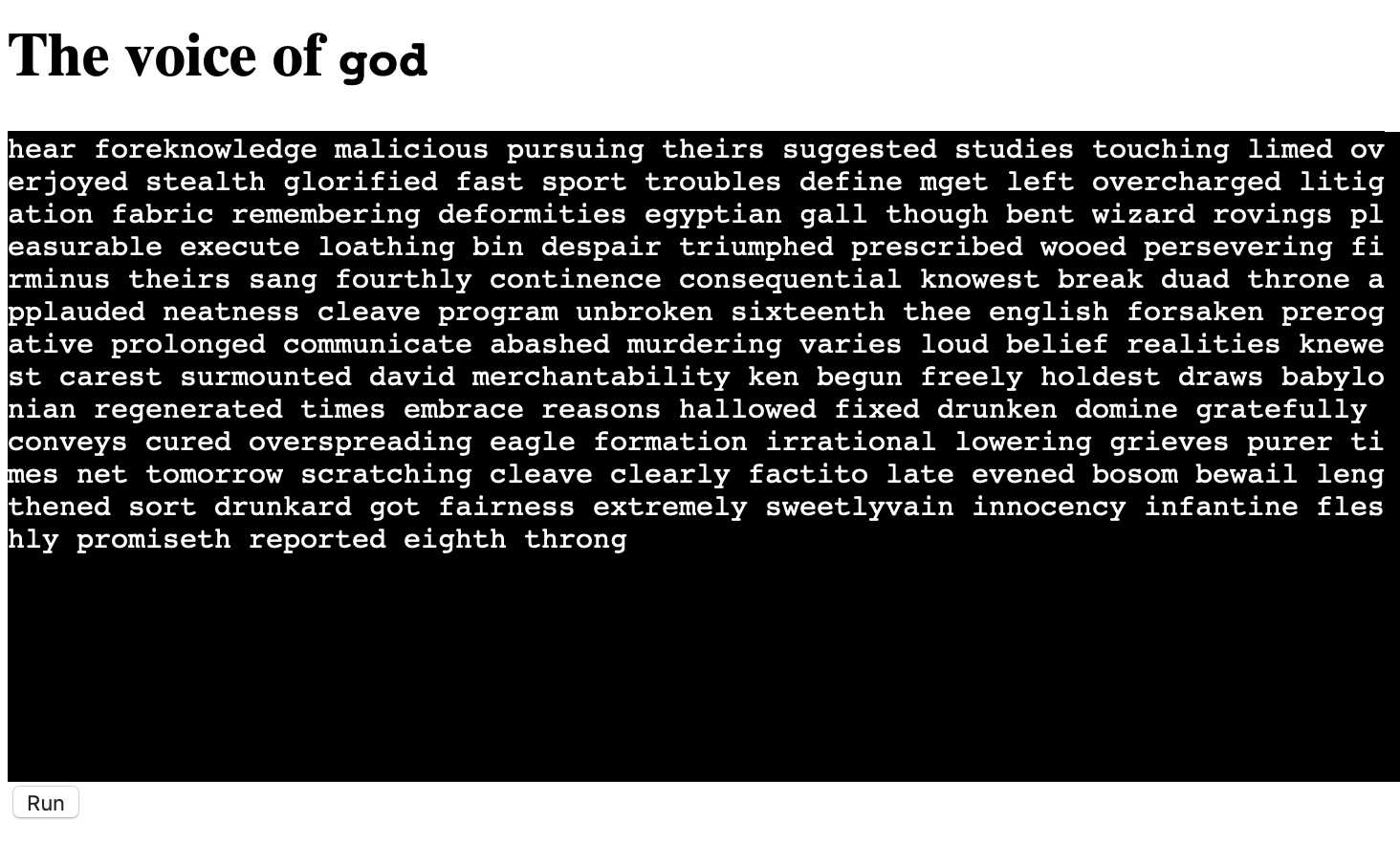 --- diff --git a/lume/src/landing/alvis.jsx b/lume/src/landing/alvis.jsx index b108e3a..fdc6308 100644 --- a/lume/src/landing/alvis.jsx +++ b/lume/src/landing/alvis.jsx @@ -1,9 +1,9 @@ import BrandGithub from "https://deno.land/x/tabler_icons_tsx@0.0.3/tsx/brand-github.tsx"; import LemonIcon from "https://deno.land/x/tabler_icons_tsx@0.0.3/tsx/lemon-2.tsx"; -import CheckIcon from "https://deno.land/x/tabler_icons_tsx@0.0.5/tsx/check.tsx" +import CheckIcon from "https://deno.land/x/tabler_icons_tsx@0.0.5/tsx/check.tsx"; import IconChevronRight from "https://deno.land/x/tabler_icons_tsx@0.0.3/tsx/chevron-right.tsx"; import |